How to Add Friends in Geometry Dash (2026 Guide)
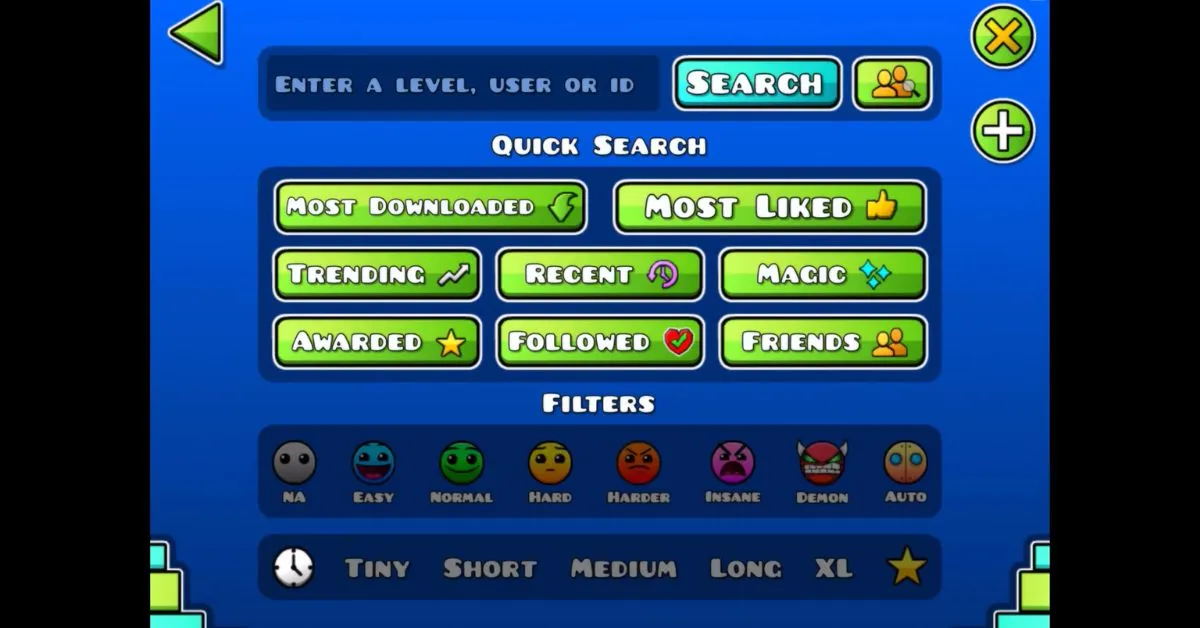
Want to know how to add friends in Geometry Dash? Adding friends in Geometry Dash makes the game much more enjoyable. You can compare stats, share custom levels, send messages, and discover new creators in the community.
Although Geometry Dash is mainly a single-player game, its social features allow players to connect with friends across PC, Android, and iOS devices. In this guide, we will break down everything step by step, including where to search and how to send friend request. Adding friends becomes very easy.
Why Add Friends in Geometry Dash?
Friends in Geometry Dash can help you improve your gameplay and discover better levels.
Some major benefits include:
- Sharing custom levels
- Comparing stars, demons, and achievements
- Discovering new creators and challenges
- Sending messages and comments
- Viewing unlisted levels
- Tracking your friends’ progress
- Getting motivation through friendly competition
Players can also access a dedicated Friends section in the search menu to quickly find levels uploaded by people on their friends list. Many players use this feature to get friends and stay connected with active creators.
Create a Geometry Dash Account First
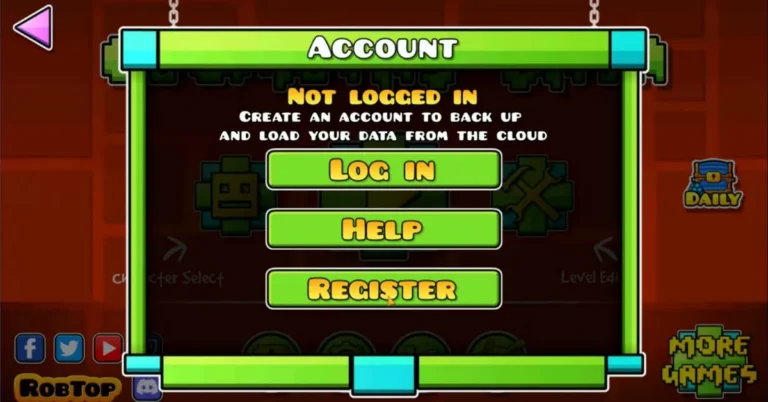
Before you can add friends, you must have a registered Geometry Dash account.
Follow these steps:
- Open Geometry Dash.
- Go to Settings.
- Tap Account.
- Press Register.
- Create a username, email, and password.
- Confirm your registration.
Once your account is active, you can start adding friends, sending messages, and saving your game progress across multiple devices, including mobile phones and tablets.
Steps: To Add Friends in Geometry Dash
There are several ways to add friends in Geometry Dash.
Search by Username
The easiest method is searching by username.
- Open the game.
- Go to the Social or Friends menu.
- Tap Search User or Search Player.
- Type your friend’s exact username.
- Open their profile.
- Tap Add Friend.
Usernames in Geometry Dash are case-sensitive, so even a small spelling mistake can stop the search from working properly. This is the most common way to add someone in the game.
Search by Player ID
If the username does not work, ask your friend for their Player ID.
Player IDs are unique numbers linked to each account and are often more accurate than searching by username. Many players use IDs when usernames are difficult to spell or contain special characters.
This method is commonly used by geometry dash friends who regularly share levels together.
Add Friends Through Custom Levels
You can also add creators directly through their levels.
If you enjoy a level made by another player:
- Open the level.
- Tap the creator’s username.
- Open their profile.
- Press Add Friend.
This is one of the best ways to connect with talented level creators and active members of the community. Many players make friends through popular custom levels and community challenges.
How to Accept Friend Requests
When someone sends you a friend request:
- Open the Friends menu.
- Go to Pending Requests.
- Select the player.
- Tap Accept.
After accepting, the player will appear on your friends list immediately.
Geometry Dash currently allows a maximum of 400 friends per account. This limit was increased from 300 in Update 2.1.
Can You Add Friends on Different Platforms?
Yes, Geometry Dash supports adding friends across different devices.
You can connect with players using:
As long as both players are logged into their Geometry Dash accounts, they can send and receive friend requests regardless of platform. Community discussions confirm that the same account can be used across devices by saving and loading account data.
Many gd players use both PC and mobile devices to stay connected with friends and creators.
What Can You Do With Friends in Geometry Dash?
Friends unlock several social features inside the game.
You can:
- View their comment history
- Send direct messages
- Access unlisted levels
- Compare stats such as stars and demon completions
- View their uploaded levels
- Follow their activity
- Use friends-only message settings
Players can also control who is allowed to send them messages or friend requests through account settings. The game allows friend requests from everyone or nobody, while messages can be set to be visible to everyone, friends only, or nobody.
Many players friend people to share custom levels privately and compare achievements.
How to Send a Level to a Friend in Geometry Dash
Sharing levels with friends in Geometry Dash is very simple. Once you upload a custom level, the game automatically generates a unique Level ID that you can share with other players.
To send a level to a friend in Geometry Dash:
- Upload or publish your level
- Copy the Level ID
- Send the ID through in-game messages, Discord, Reddit, or social media
- Your friend can search the ID in the game’s search menu
You can also share unlisted levels directly with geometry dash friends if you do not want the level to appear publicly. Many players use this feature to test levels privately before full release.
Another easy way to share a level is by sending your profile to a friend and asking them to open your uploaded levels section.
How to Play With Friends on Geometry Dash
Geometry Dash does not currently include a real-time multiplayer mode, but players still find many ways to play together with friends.
Some popular ways to play with friends include:
- Competing for higher star counts
- Challenging each other to beat demon levels
- Sharing custom levels
- Racing to complete the same level faster
- Collaborating on level creation projects
- Watching each other’s gameplay streams
Many gd players also join Discord servers and online communities to make friends, exchange challenges, and discuss new updates.
On mobile and PC, players can use the same Geometry Dash account to stay connected with friends across multiple devices.
Common Problems When Adding Friends
Sometimes players face issues while adding friends in Geometry Dash.
Friend Does Not Appear in Search
This usually happens because:
- The username is misspelled
- Capital letters are incorrect
- The account is inactive
- The servers are slow
Using a Player ID is often the best solution if the username search does not work.
Friend Request Is Not Sending
Friend requests may fail because of:
- Weak internet connection
- Server maintenance
- An outdated version of the game
- Friend requests are being disabled
- A full friends list
Some players also report temporary issues when both accounts are on the same IP address or network. Community discussions suggest reinstalling the game or using another connection can sometimes solve the issue.
This can sometimes stop players from trying to send friend requests successfully.
Cannot Accept Friend Requests
If you cannot accept requests:
- Restart the game
- Refresh the social tab
- Clear old pending requests
- Make sure you are logged into the correct account
Sync problems can sometimes occur when using multiple devices with the same account.
Tips for Building a Strong Friends List
If you want more active friends in Geometry Dash, try these tips:
- Join Geometry Dash Discord servers
- Comment on popular levels
- Add creators whose levels you enjoy
- Participate in Reddit communities
- Share your username on social media
- Send friendly messages with requests
- Stay active in level creation communities
Many players do this regularly to get friends faster and grow their social circles in the game.
Many players also add people to unlock icons and achievements related to the number of friends on their list. Community posts show that some users actively exchange friend requests to reach the 25-friend milestone.
Conclusion
Adding friends in Geometry Dash is one of the best ways to enjoy the game beyond solo gameplay.
You can connect with other players, compare stats, share levels, and become part of the larger Geometry Dash community. Whether you search by username, Player ID, or custom levels, the process is quick and simple once you know where to look.
If you want to improve your skills and make the game more fun, building a strong friends list is a great place to start. Many players eventually friend someone new every day through levels, comments, and online communities.
Frequently Asked Questions
Can I add friends without an account?
No, you need a registered Geometry Dash account to send and receive friend requests.
Are usernames case-sensitive in Geometry Dash?
Yes, usernames are case-sensitive, so you must enter the exact spelling and capitalisation.
How many friends can I have in Geometry Dash?
You can have up to 400 friends on one account.
Can I block friend requests?
Yes, account settings allow you to disable friend requests completely or limit messages to friends only.